











| Processor: | 1 gigahertz (GHz) or faster with 2 or more cores on a single chip compatible 64-bit processor or SoC (System on a Chip). | |
| RAM: | 4 gigabytes (GB) | |
| Storage space: | 64 GB or more
Note: See below under “Additional information about storage space to keep Microsoft Windows 11 up to date” for further details. |
|
| System firmware: | UEFI, Secure Boot capable | |
| TPM: | Trusted Platform Module (TPM) version 2.0 | |
| Graphics card: | Compatible with DirectX 12 or higher with WDDM 2.0 driver | |
| Advertisement: | High-resolution display (720p) with a diagonal of more than 9 inches, 8 bits per color channel | |
| Internet connection and Microsoft accounts: |
|
Microsoft Office 2019 Professional Plus
With this license, the software can be activated on 3 different devices, e.g., home PC, notebook, and work PC.
30-day full refund – Lifetime replacement guarantee
Choose Microsoft Office 2019 Professional Plus today and get the latest office solution from Microsoft. In addition to the familiar applications, you automatically get access to browser-based apps and Skype for Business. Simplified communication allows you to collaborate with others even more effectively.
Everything you need at a glance:
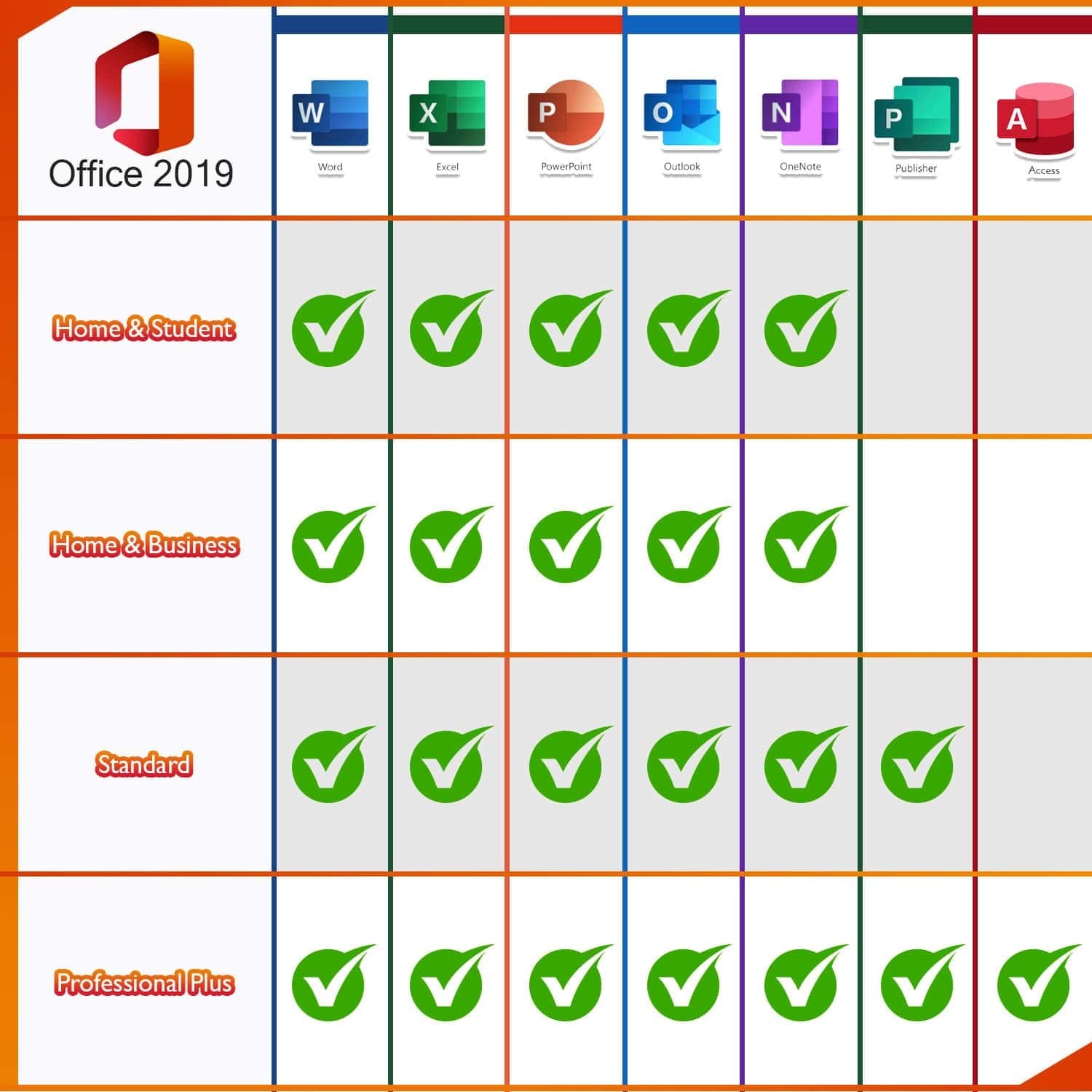
- Word 2019 – for creating and editing your texts and documents
- Excel 2019 – for processing data records in tabular form
- PowerPoint 2019 – for creating captivating presentations
- Outlook for 2019 – for managing emails, contacts, appointments, and tasks
- Publisher 2019 – for easily creating professional-looking publications
- Access 2019 – for database creation with Internet access
- Lync 2019 (Skype for Business) – for greater productivity through instant messaging and easy communication and collaboration with HD video conferencing
- Web apps (Word, Excel, PowerPoint)
OneNote is no longer part of the Microsoft Office package, but is available as a standard application in Microsoft Windows 10, which is a prerequisite for using Microsoft Office 2019. Older versions of Microsoft Windows are not supported.
teamwork
Collaborative work is an important and decisive innovation in the Microsoft Office package. Your employees can make changes to a file or continue working on the document at the same time. This option is available for all Microsoft Office components, from Word to Excel and PowerPoint to OneNote. The files simply need to be stored on OneDrive or OneDrive for Business or SharePoint Online and shared with the relevant employees. Sharing is done easily via a button in the program.
Skype for Business is another tool in the Microsoft Office 2019 Professional Plus package that promotes collaboration. Users can see the online status of team members at a glance and start a chat, internet call, group conversation, or video broadcast as needed.
Support:
If you have any questions, please do not hesitate to contact us by email. Our customer support is available 24 hours a day, 7 days a week.


Reviews
There are no reviews yet.